APEXTRAX Ecosystem:
Spatial Tracking Onboarding and UX
Intro
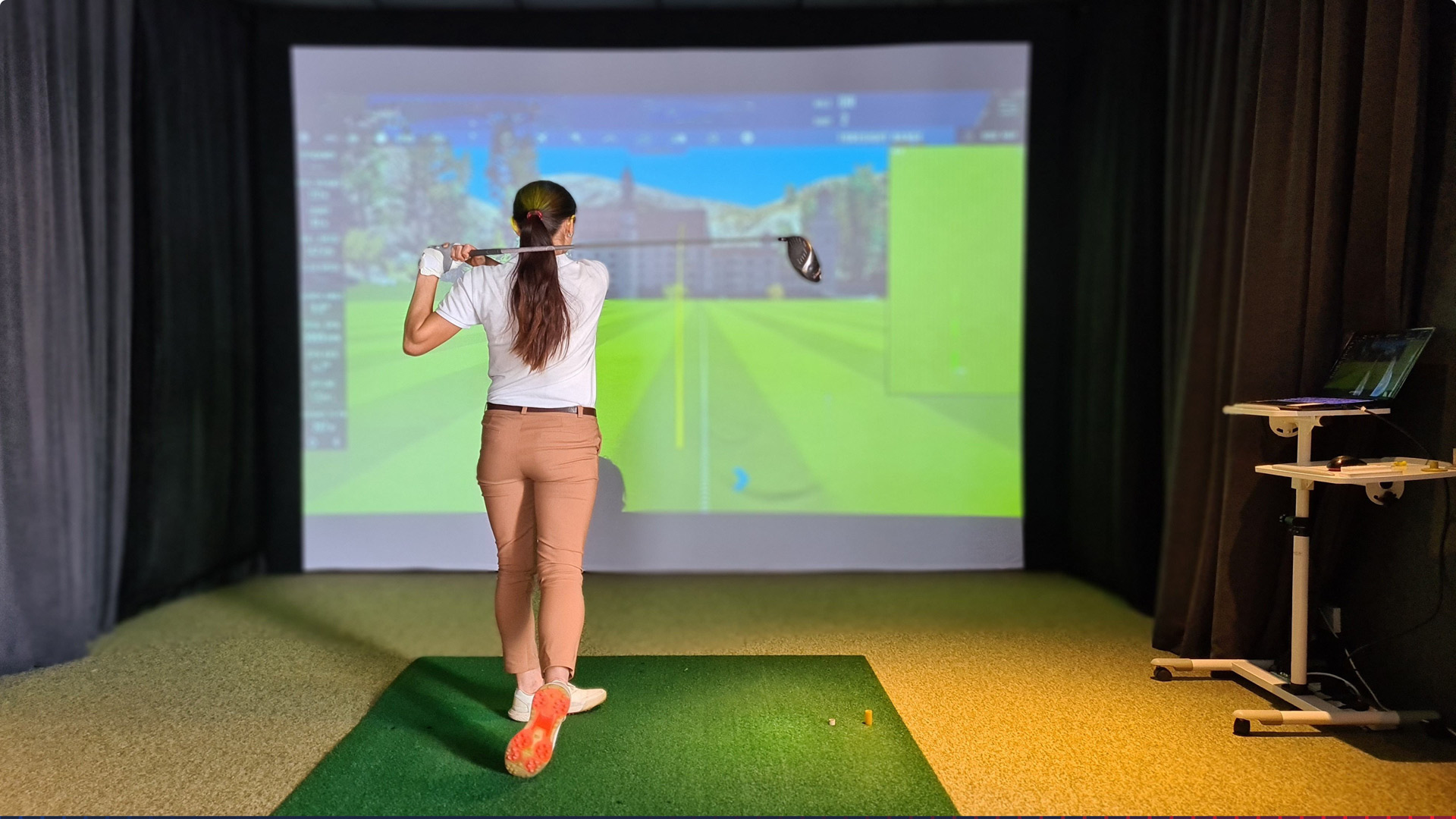
Starting with ambiguous product requirements and minimal initial direction, I assumed complete ownership of the product definition and UX strategy. I established the research scope, audited the competitive telemetry landscape, and mapped out the physical-to-digital constraints of a permanent, 9-foot ceiling-mounted 6-camera optical system. This autonomous process allowed me to transform a complex hardware prompt into an end-to-end, production-ready onboarding ecosystem, reducing physical alignment errors and streamlining multi-platform setup.
Utilizing APEXTRAX ‘s foundational brand assets and project parameters, I took a deep dive into competitive products, business goals, and environmental user constraints. Rather than designing isolated screens, I mapped out a complete spatial onboarding flow that accounts for real-world user movement, physical camera placement, and rapid club pairing. Ensuring accurate data capture from the very first swing and being a guide every step of the way to assure the value of the product to the user.
- Role: Solo Product Designer & Strategist
- Scope: Spatial Alignment, Mobile-Platform Onboarding, Design Systems, Data Strategy
- Core Objective: Eliminate configuration friction for permanent overhead hardware, bridge dual-platform ecosystem switching, and validate high-end product value from the first swing.
- Project Type: Conceptual Product Redesign & UX Case Study
- Domain: Sports Telemetry & Spatial Hardware Calibration

Phase 1: The Research and Groundwork
Before moving forward with any design, it was imperative that I focus on research that could better steer the design decisions. The first phases of my research began with their current versions of the application and ended with understanding their business goals.
- I reviewed the flows of their existing onboarding design and videos of their products being used. This included interviews with industry reviewers, which gave me more insight into the intended goals for the product.
- I studied the technology of their telemetry device and compared their onboarding to how competitors set up their own devices.
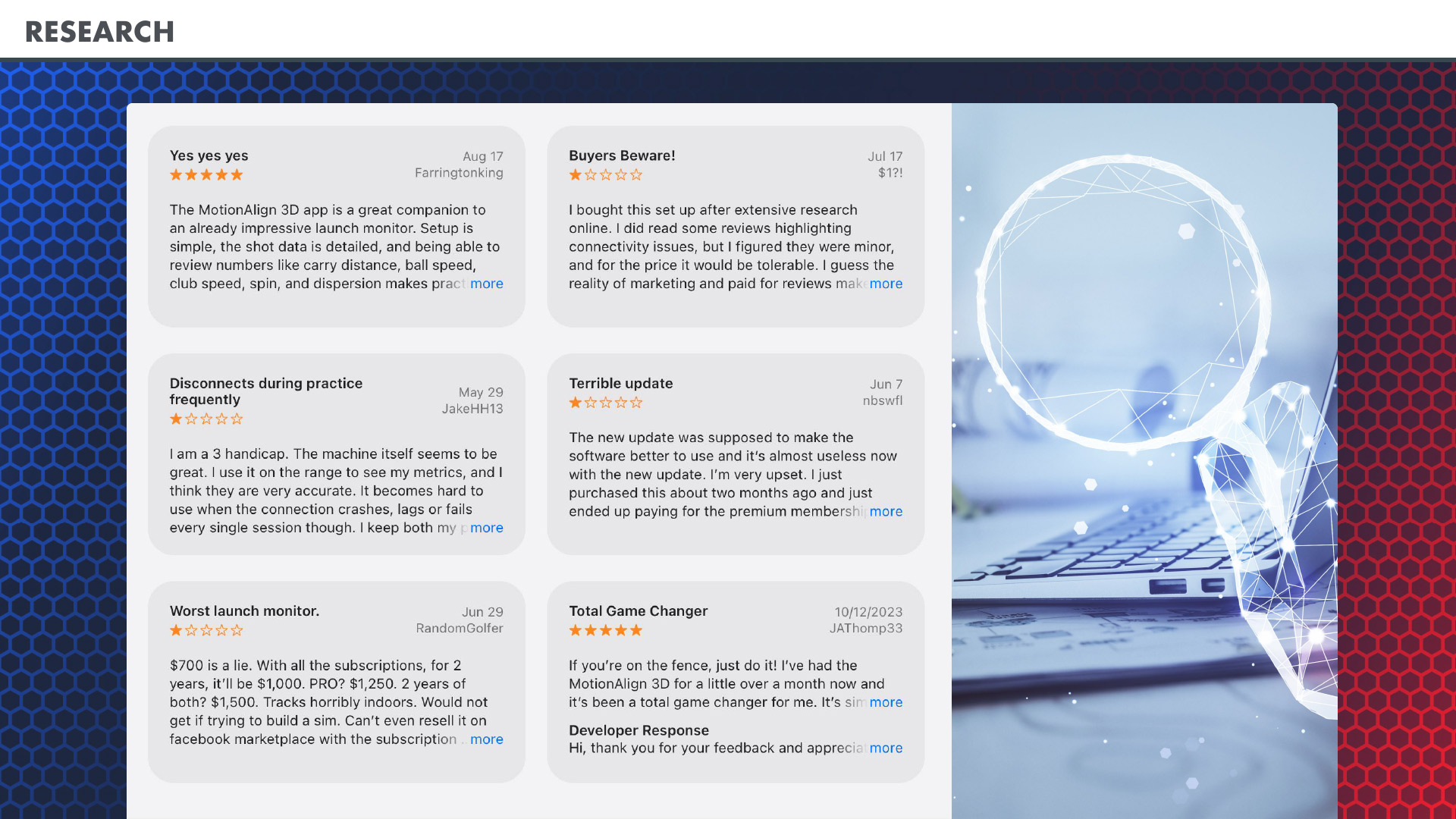
- I mined reviews to gain insight into their current app’s pain points.
- I reviewed the locations where their devices would be used and considered environmental frictions like glare from overhead lighting.
- Modeled the hardware installation flow firsthand to identify physical friction points.
- Due to a lack of style guide documentation, I reviewed their app and website CSS to find the design language and styles used to define a more complete vision of how to set up their branding and design system for the mockups.
- Reviewed and established business goals and aligned those with supporting the goals of the user.
Technical Research: To better understand the equipment I was onboarding for, I studied the current mobile onboarding system, reviewed interviews for more technical specs on the MotionAlign 3D, and performed a brief competitive audit of the Protee VX and the VTrack, which also have a markerless tracking system. Compared how our unique technological advantage had more requirements. Most lack consideration of the external UX of setting up the device and only focus on the digital experience.
Review Mining: To extract authentic user sentiment without direct interview panels, I utilized AI-driven data mining to analyze public App Store reviews from APEXTRAX’s existing application ecosystem and identify pain points to solve for:
- Problem: Users experience severe UI lag or pairing delays because the interface fails to proactively validate local Wi-Fi conditions before a session begins.
The UX Opportunity: Transition from passive pairing to active, real-time environment diagnostics. - Problem: Unresponsive “Update” buttons and a lack of step-by-step progress tracking create high user anxiety and a perception of a “bricked” device during synchronization.
The UX Opportunity: Integrate firmware updates as a core, high-visibility, progress-tracked onboarding milestone. - Problem: Core account setups suffer from high interactive friction, ranging from rigid birthday pickers that require scrolling through decades to overly complex compliance loops for youth players and multi-user profile synchronization.
The UX Opportunity: Simplify administrative data entry with predictive inputs and streamlined group/roster creation.
Phase 2: Access and Ergonomic Design:
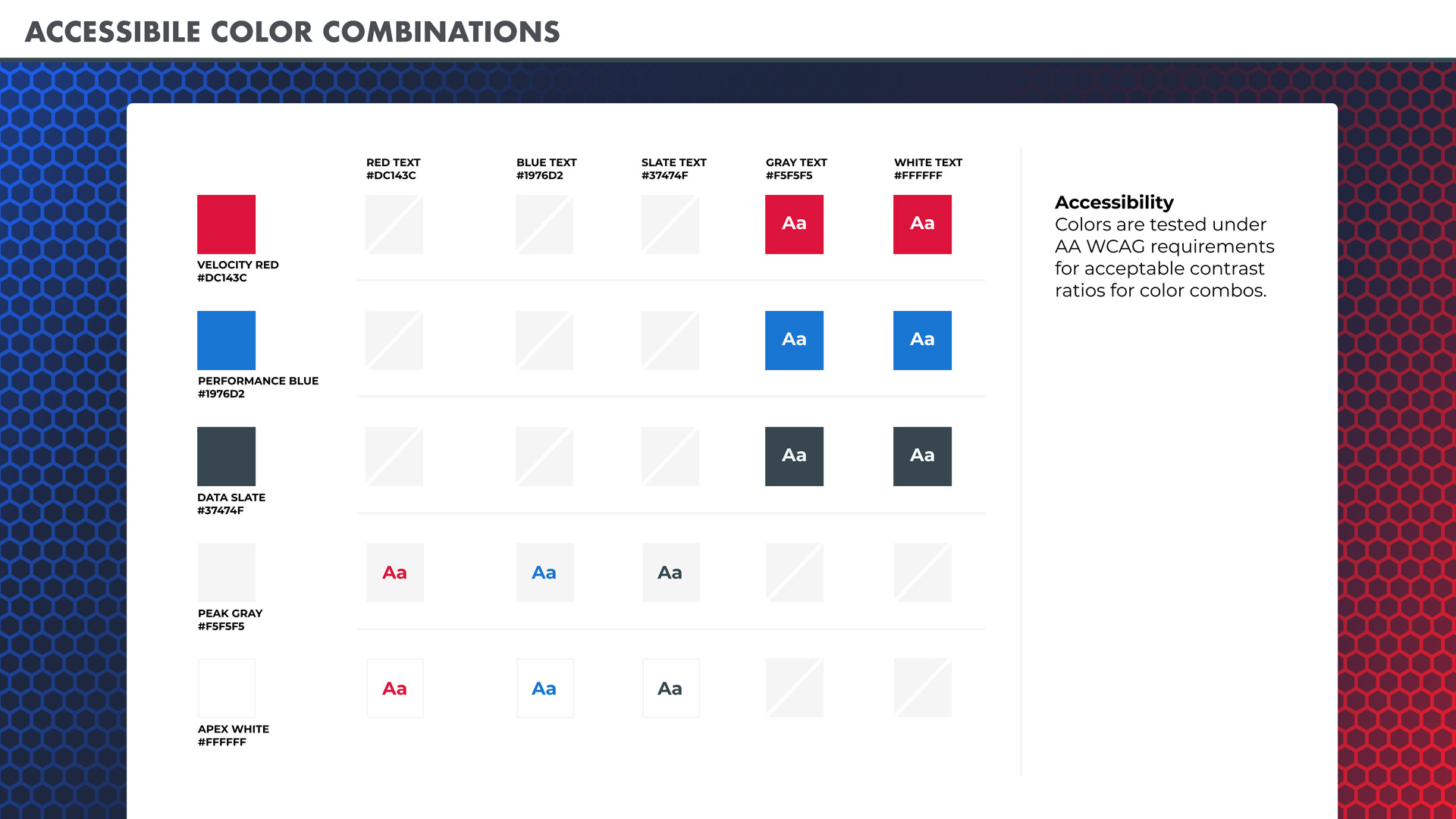
Accessibility: Leveraging professional experience in WCAG AA-compliant design frameworks, I performed a stress test on APEXTRAX’s core branding tokens. By establishing high-contrast color pairings (exceeding a 7:1 ratio) and scalable typographic proportions, the MotionAlign 3D onboarding guarantees immediate legibility for all users, including those with visual and cognitive edge cases.
Situational Ergonomics & Environmental Friction: Golf software does not operate in pristine, lab conditions. It lives in high-glare overhead lighting and driving ranges, dimly lit garage bays, and high-distraction environments. To account for these real-world situational limitations, my UX parameters are explicitly designed for the environment:
- High-Velocity Glare: Eliminating thin-weight typefaces and subtle gray gradients in favor of high-contrast, bold geometric hierarchies. Making this a core design pillar, it will translate to other applications such as outdoor mobile products.
- Gloved Finger Interaction: Expanding standard mobile touch targets (44pt) to an ultra-ergonomic 48pt minimum boundary with generous padding, preventing accidental triggers or missed selections while wearing golf gloves.
Business Objectives met by UX Design: By translating APEXTRAX’s core business metrics into intentional interface guardrails, the onboarding architecture directly protects hardware ROI, maximizes feature adoption, and minimizes operational overhead.
- Operational Efficiency: Support Ticket Reduction
- System Engagement: Retention & Reduced Session Abandonment
- Ecosystem Clarity: Cross-Platform Friction Mitigation
- Value Realization: Feature Adoption & Ecosystem Monetization
- Build interactive, real-time spatial calibration guides for the overhead system. Ensuring the hardware continuously operates within optimal structural parameters guarantees the accurate telemetry needed to out-compete ProTee VX and VTrack.
Phase 3: Journey Map & Personas
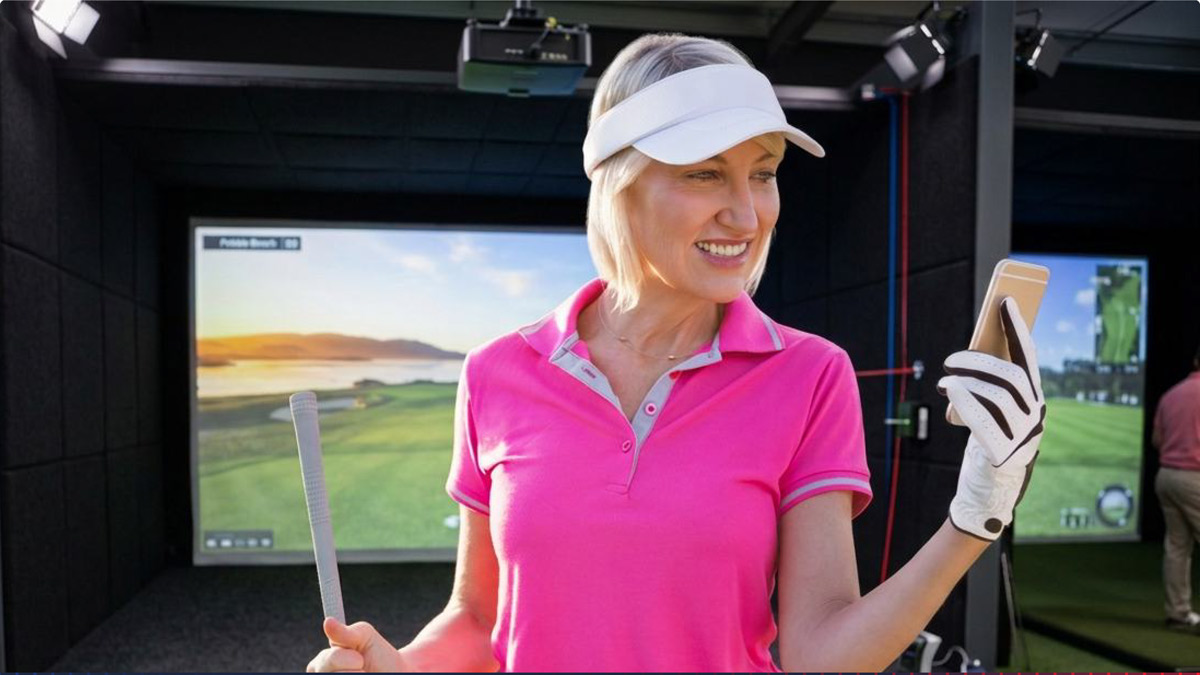
Jake Birdison: A tech-savvy, mid-tier amateur golfer who just invested in a premium home simulator bay to shave strokes off his handicap during the off-season. He expects an easy setup that can transition quickly from unboxing to hitting his first tracked drive.
Marcus Vance: A dedicated golf academy instructor and club fitting specialist who installed the overhead unit in his commercial teaching bay. He needs a bulletproof, frictionless multi-student onboarding flow that allows him to rapidly switch between client profiles, record baseline swing metrics, and trust data accuracy across every session without spending billable lesson time troubleshooting hardware alignment.
Elena Rostova: A high-earning, casual golfer who recently added a multi-purpose indoor simulator to her home entertainment space for family play and social gatherings. Intimidated by complex telemetry metrics like smash factor or club path, she relies on intuitive, progressive data disclosure and immediate, visual feedback on basic carry distance so she can enjoy a full-round simulation on scanned courses without feeling overwhelmed by technical configuration.
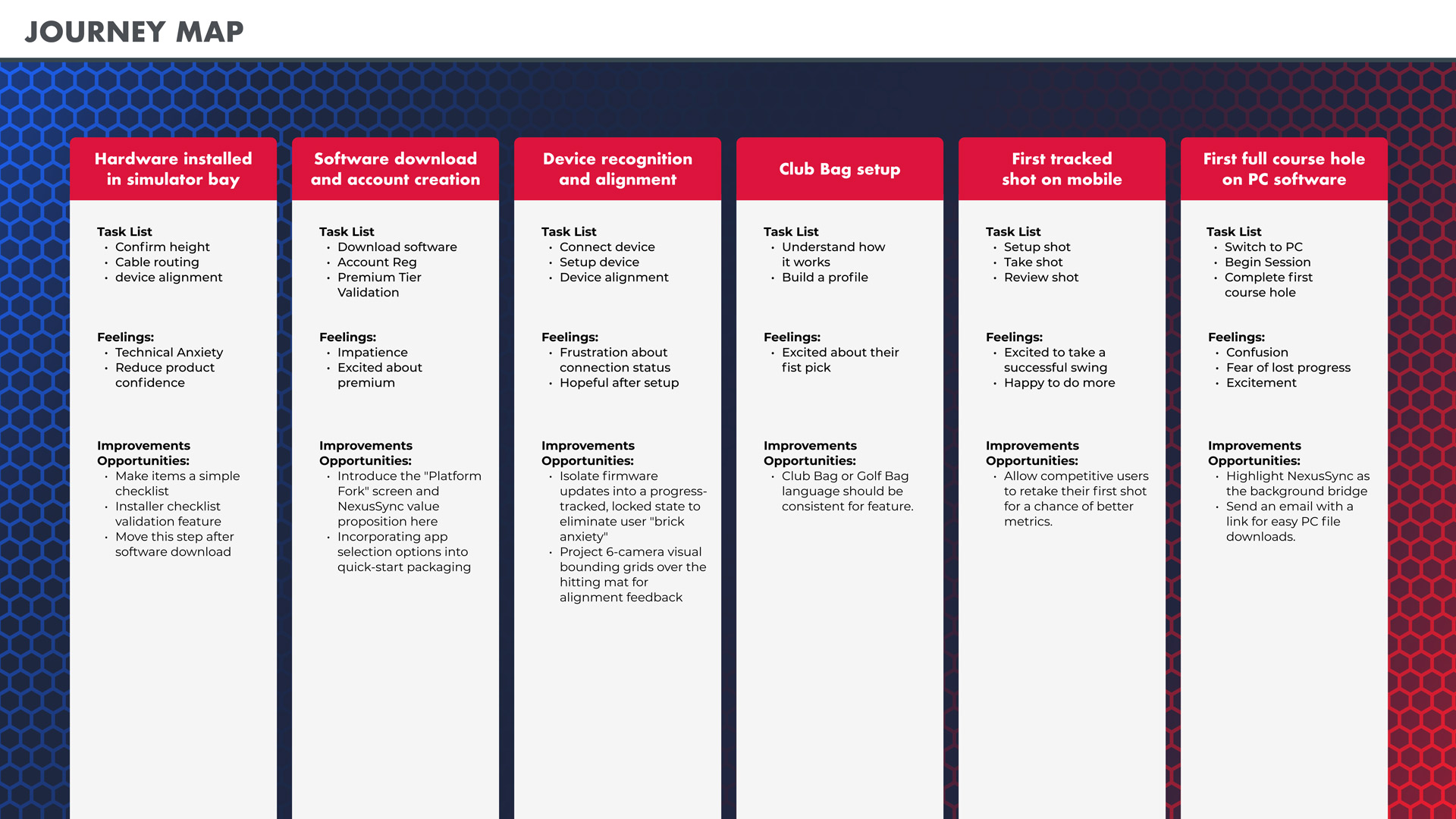
Phase 4: Deconstructing the Onboarding Architecture
A critical analysis of the initial deployment brief revealed two systemic architectural conflicts that would introduce severe operational friction in a live production environment:
- The Cross-Platform Disconnect Loop: Forcing a user to switch physical host platforms (Mobile to PC) mid-onboarding introduces highly volatile network re-pairing variables.
- User vs. Installer Lifecycle Conflict: Requesting an end-user to audit cable routing and mechanical physical clearance after a professional installation degrades consumer confidence and adds unnecessary technical anxiety.
- Can this device run exclusively on PC or Mobile app: Does a user require both? If both systems are required for onboarding, a logical and convenient breaking point must be established for seamless integration.
The Solution: Configurations & The NexusSync Ecosystem Fork
- Installer Mode Delegation: Technical hardware, baseline leveling, and physical data loops are isolated into an independent system deployment path for technicians.
- The Consumer Welcome Portal: The end-user is greeted with an optimized, software-driven checklist that assumes structural readiness and moves directly into experience personalization.
- Early Platform Forking: The user chooses their primary host environment (Mobile vs. PC) upfront, using NexusSync as a background synchronization layer to prevent mid-session hardware switching. Providing the option early in the unpacking process or with instructional cards from the installer to provide the user early options for which onboarding platform they want to complete first.
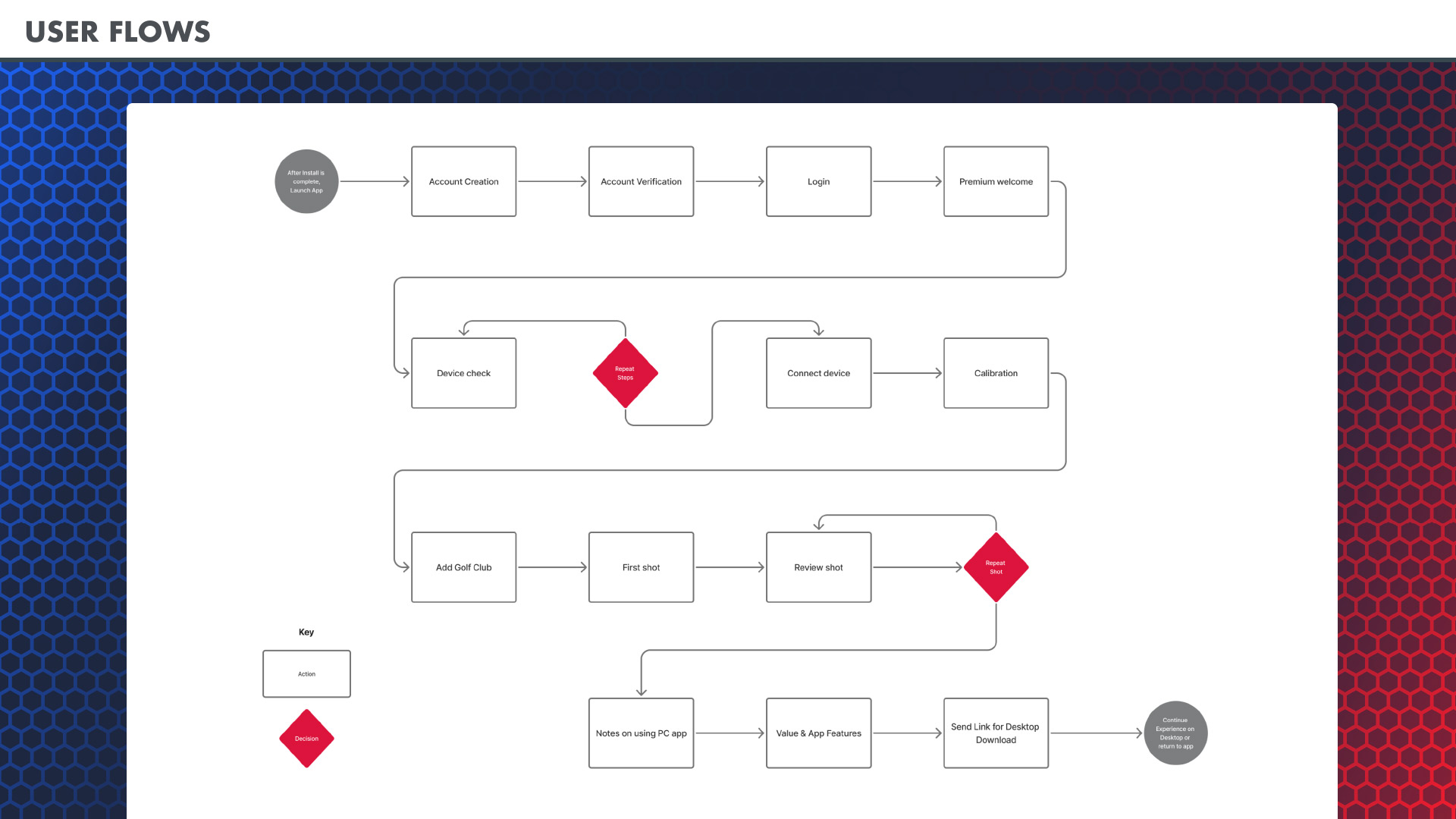
Wireframes: The Iterative Loop
Using insights from the journey map and heuristic audit, this wireframe acts as our production-ready blueprint for testing and rapid refinement. Designing for a physical simulator space requires thinking outside the glass screen. This framework intentionally bridges the gap between systems architecture, game dev constraints, and hardware QA variables. Whether a user misses a step during camera calibration or faces an offline network error, these flows provide clear off-ramps to keep them moving forward. It’s a solution engineered to protect the golfer’s momentum without disrupting APEXTRAX’s established design patterns.
You can view the APEXTRAX interactive wireframe here.
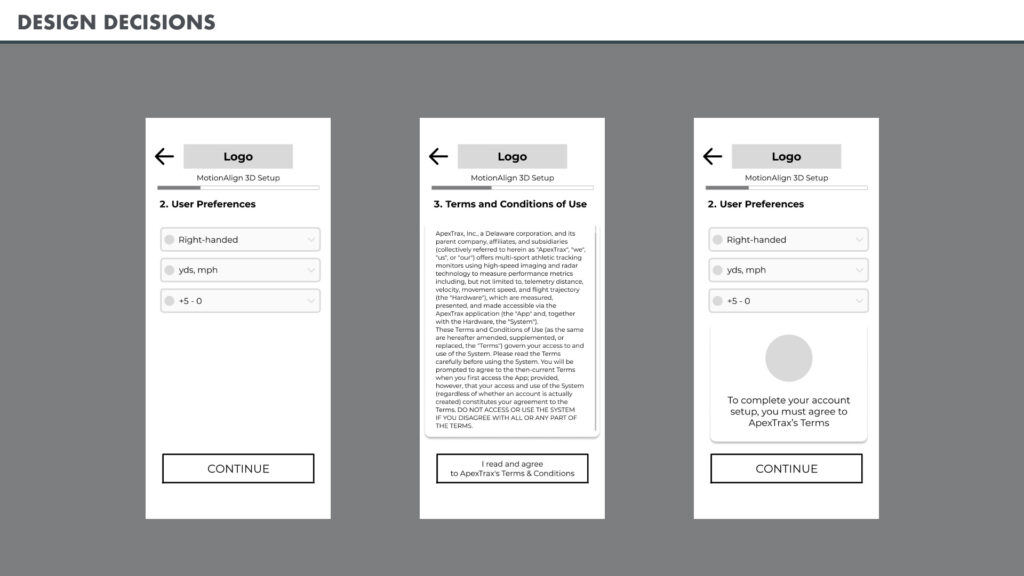
Design Decisions 1 of 9: Guided Terms
Terms agreement condensed into a single frame with a gentle notification that it must be completed to continue if the user tries to use the back navigation to bypass it.
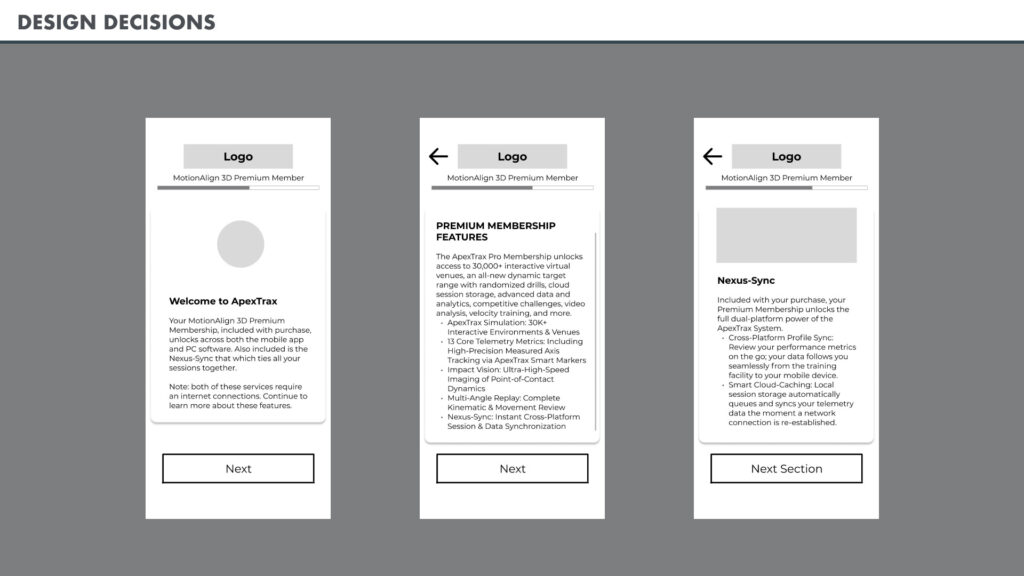
Design Decisions 2 of 9: Demonstrating Value
Premium, membership, and Cloud Save cards give the user the breadth of benefits from the premium account. Explaining the Cloud Save feature prepares them for the transition from mobile to PC later.
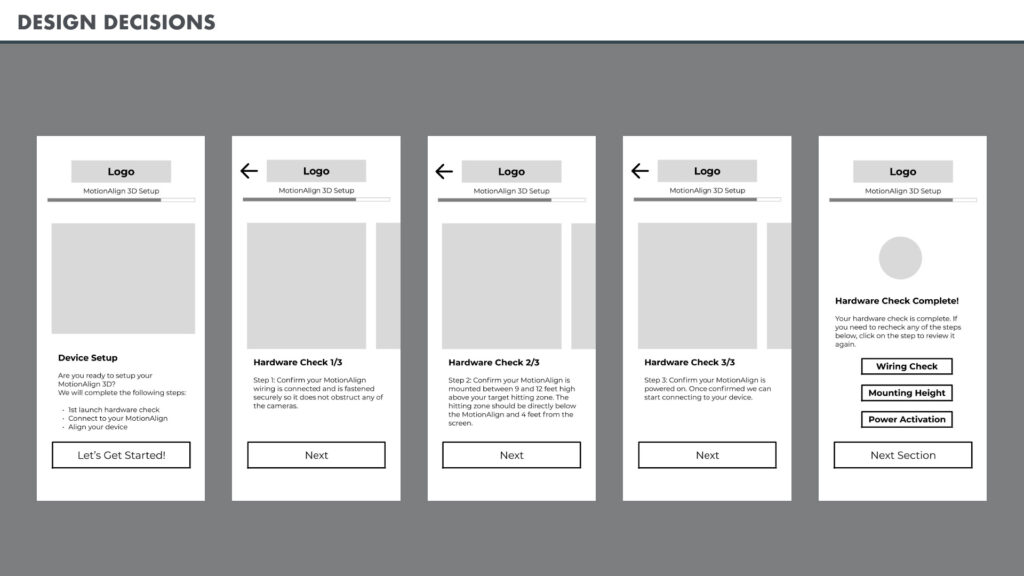
Design Decisions 3 of 9: Device physical check.
Designed to get their participation with visual inspection, while not making them feel like they are installing it themselves. The final screen in this section allows them to return to any steps in case they blindly clicked next without confirming.
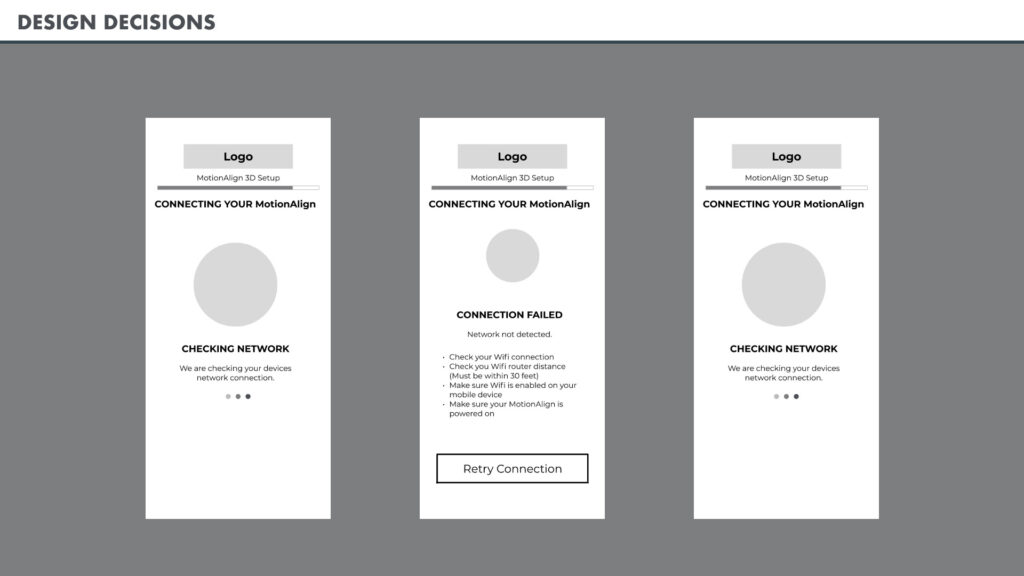
Design Decisions 4 of 9: Progress Feedback
A loading or processing animation lets the user know that the app has not frozen and is still working. Each step is designed to keep them informed on all the system processes and to let them know it is progressing. For this demonstration, I added a connection failed screen to illustrate providing steps to correct the issue for the user if an error occurred.
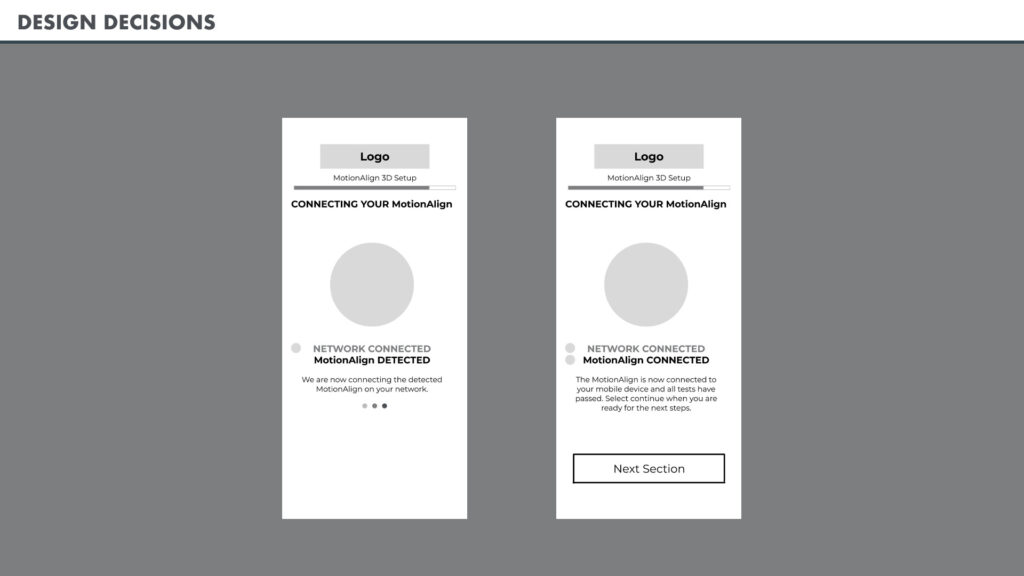
Design Decisions 5 of 9: Check-off List
Adding an indicator next to the process shows it is complete. Changing the color of the completed process and emphasizing the step in progress informs them we are moving through each phase. Incrementally updating them allows the user to not get impatient when they feel progress is not being made.
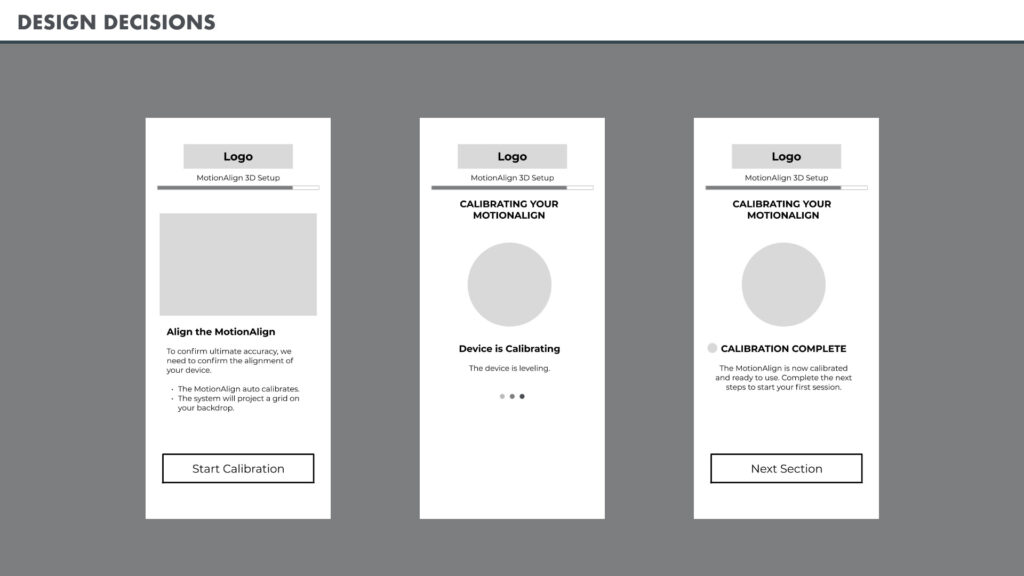
Design Decisions 6 of 9: Adding Install Confidence
The UI guides the user to center the ball within the Capture Window without requiring manual calibration boards, keeping the physical-to-digital transition completely frictionless. Since the device auto-calibrates, we want the user to know the status of the process, so they are willing to wait.
Additional Notes: If the process during testing is a long wait, this can be a good area to provide tips and notes about the product.
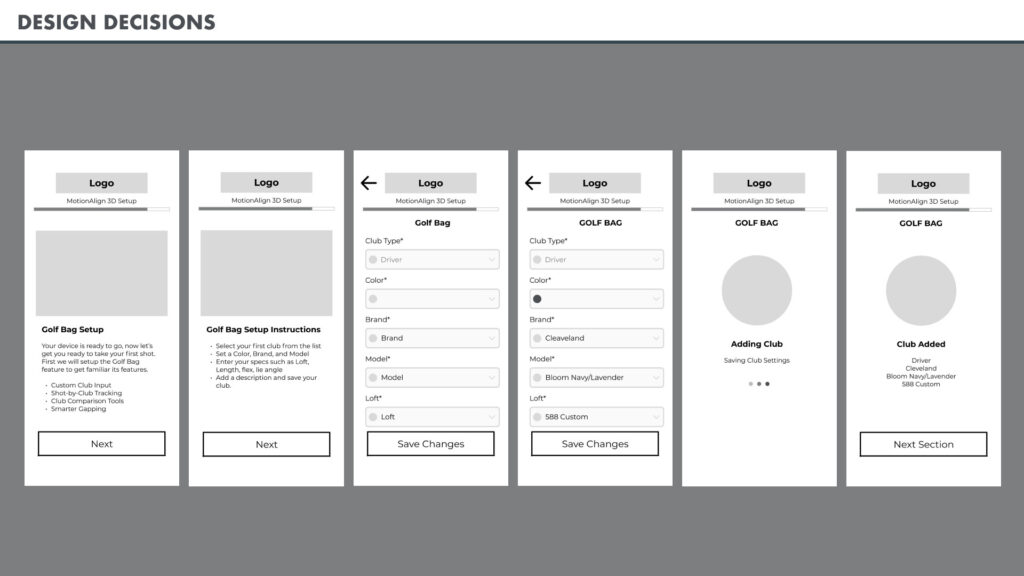
Design Decisions 7 of 9: Micro Onboarding
The Golf Bag setup should be visually similar to the full process but lacking some features. We do not want the user building out a whole bag now; we just want them to get a single club setup so they can move on to their first shot.
Additional Notes: The final screen confirms all the settings they chose and should translate to the full My Bag version without having to train them further.
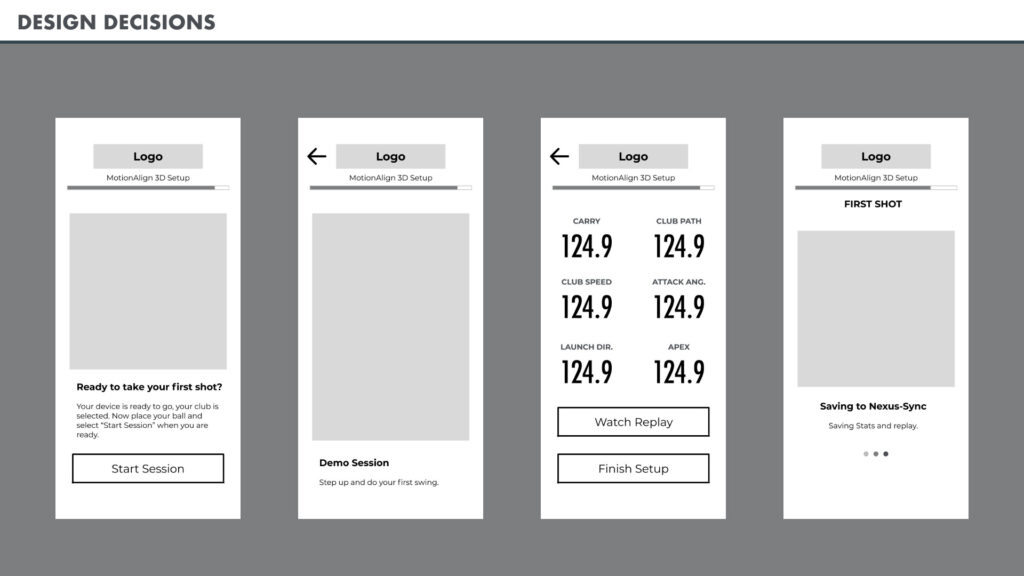
Design Decisions 8 of 9: The art of the Redo
We want the user to know their Cloud Save is already working for them. This transition screen tells them that the session is saved to inform the PC transition later.
Additional Notes: While we want the user to complete their first shot and move on, we understand that the competitive nature of some users wants their first shot to be higher ranked. Providing them a back button at the stat screen gives them the ability to retake the shot, but not announcing the feature for the average user who is happy to move on.
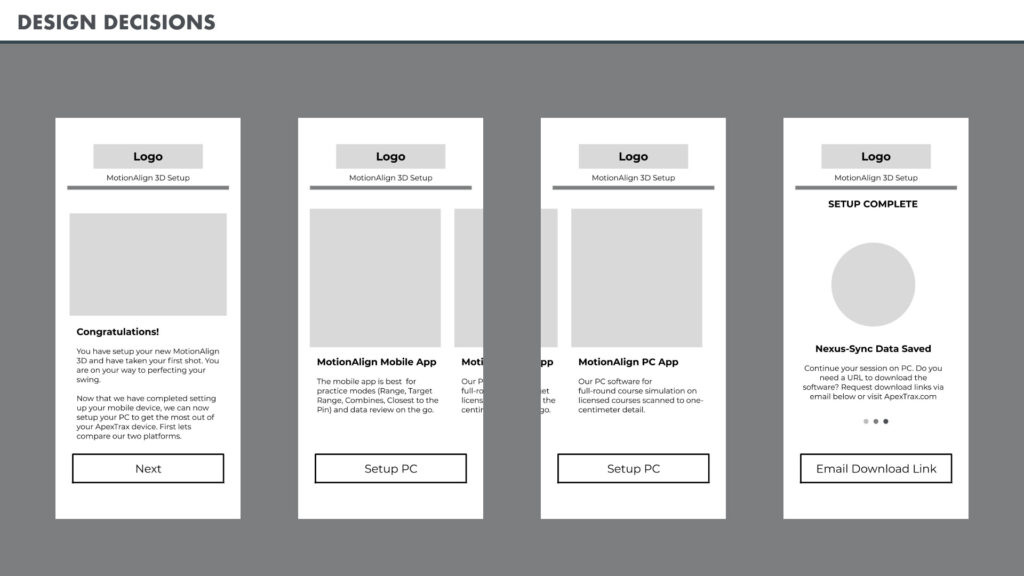
Design Decisions 9 of 9: The art of the Redo
Informing the user that the session is saved in Cloud Save gives them confidence that they can transition into the next platform and the system is working. Not everyone has devices in the same ecosystem; some have Apple mobile while having Windows desktops. To easily onboard them to the next platform, having the ability to request that our system send a URL with the direct download page will streamline the setup process.
Further testing and discussion: While we are trying to transition the user from the mobile setup to desktop, we do not want to lock them out of the system until the next is complete. They may want to only use one for now. Allowing them to go into the full app after this without hindering the PC onboarding would be key to giving the user freedom for what best suits them.
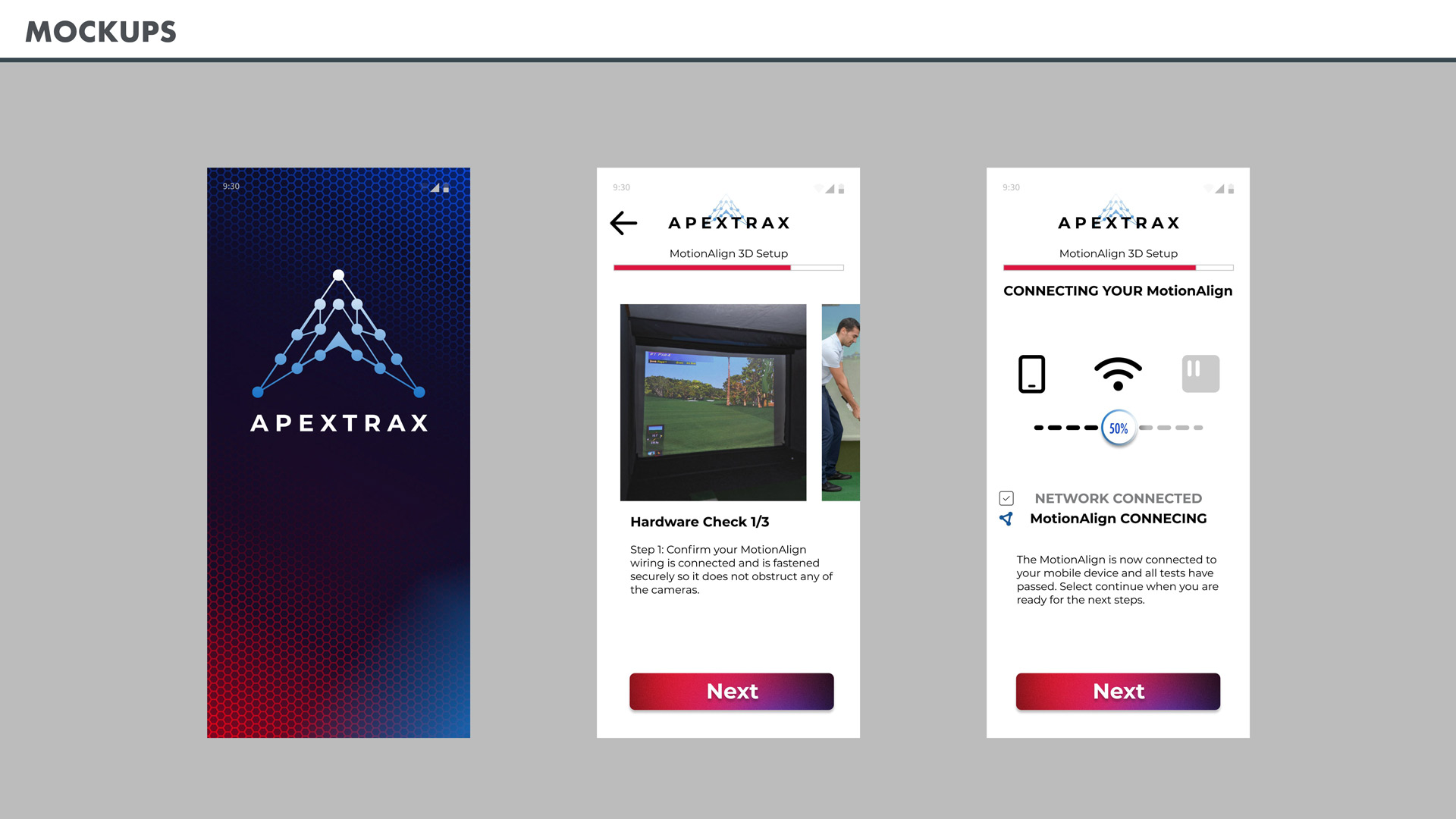
Mockups: Developing the visual language
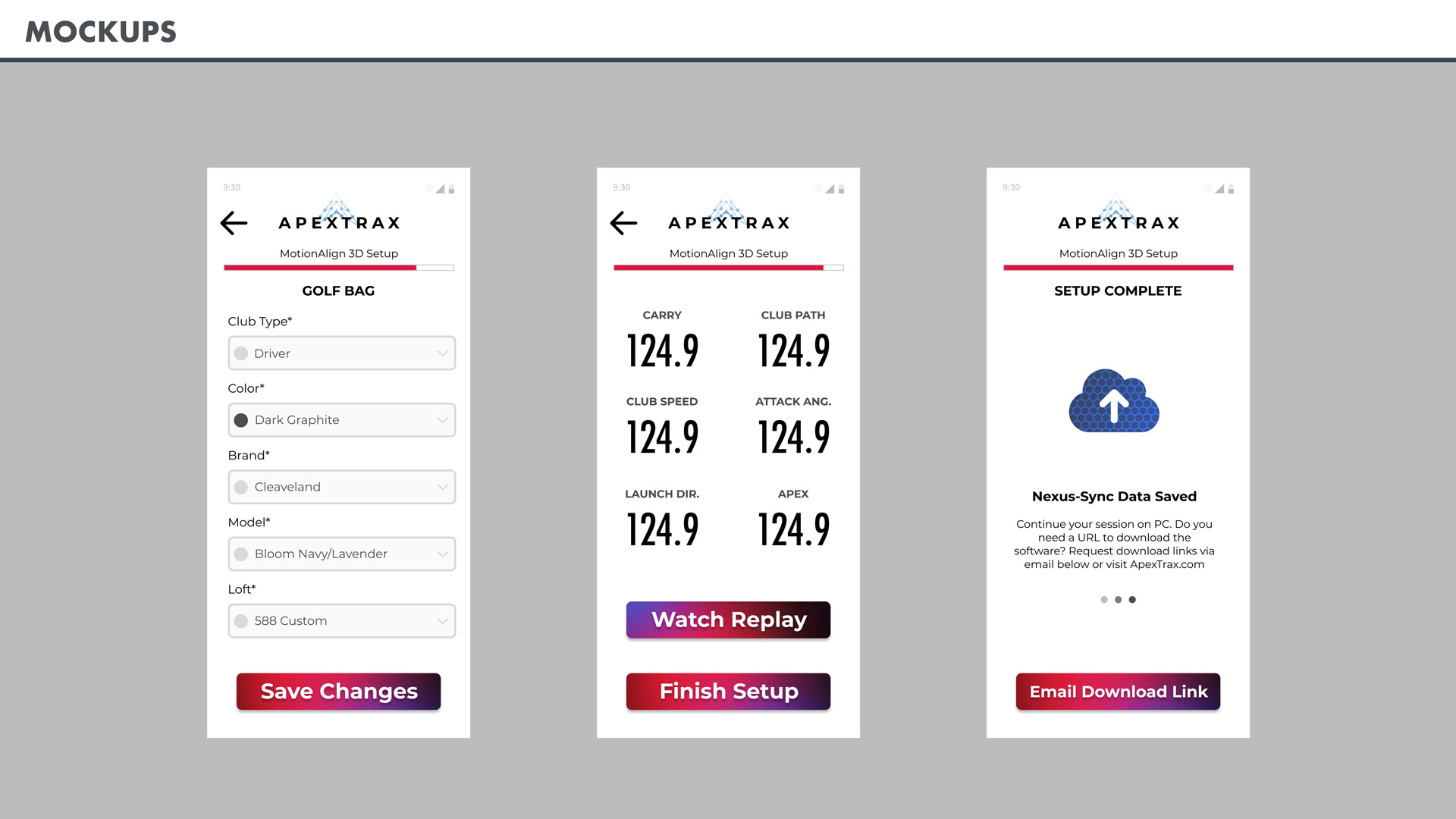
Translating the APEXTRAX elements into a design system to support the structure of the wireframes considers all aspects of legibility and the elements needed to communicate the state of the application process to the user. Colors from the brand were used as accents and to emphasize different signifiers. This gives the user a product they know that is part of the APEXTRAX ecosystem while clearly allowing them to decipher the information from their shots.
Retrospective: Navigating the Product Lifecycle
Designing the APEXTRAX onboarding experience presented a unique challenge in physical-to-digital spatial UX. By accounting for physical bay constraints and auditing the real-world installation flow, I ensured that digital guidance seamlessly mirrored hardware reality. Facing limited initial documentation, I leveraged unconventional research methods, such as AI-driven public review mining and CSS inspection, to establish a comprehensive, accessible design system. Ultimately, this project streamlined the multi-platform onboarding journey, resolved cross-device friction, and immediately validated product value for every golfer from their very first swing.
- Hardware-to-Software Spatial UX: Validating the physical setup environment firsthand was critical to creating intuitive, step-by-step digital guidance for a permanent 9-foot ceiling mount.
- Resourceful Discovery & Systems Thinking: In the absence of formal style guides, I extracted design tokens directly from web inspector data and mined public app reviews to identify real-world user friction points.
- Streamlined Multi-Platform Flow: The final design eliminated key device-switching friction, accelerated spatial calibration, and reinforced high-investment product value from the initial shot.